-
Home

-
Crypt-o
-
Documentation
- Crypt-o system options - Security
 |
Crypt-o system options - Security |


|
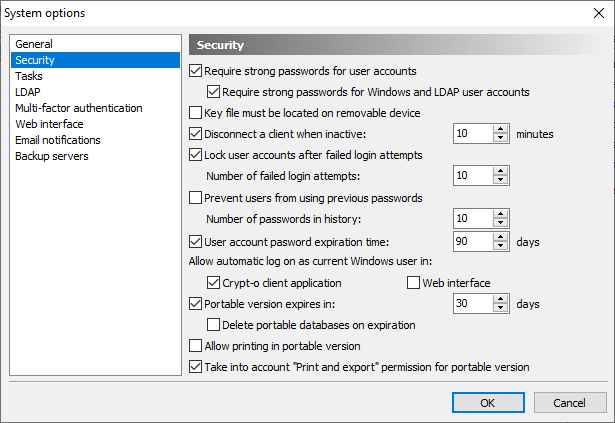
 Require strong passwords for user accounts - when this option is selected, passwords for user accounts must conform to the following rules:
- minimum password length is 8 characters;
- a password must contain mixed case letters, digits and special symbols.
If this option is not selected, any password longer than 4 characters can be used for user accounts.
 WARNING: Do not use weak passwords for user accounts.
Require strong passwords for Windows and LDAP user accounts - when this option is selected, passwords for Windows and LDAP user accounts must conform to the rules, described above.
Key file must be located on removable device - when this option is selected, users must store their key files on a removable devices. If a key file is not located on a removable device, user log on will fail.
Disconnect a client when inactive - this option forces automatic disconnection of inactive client connections on expiry of the given time interval.
Lock user accounts after failed login attempts - when this option is selected, Crypt-o will lock user accounts after specified number of failed login attempts.
 NOTE: Administrator user accounts will not be locked to prevent misuse of this function.
Prevent users from using previous passwords - when this option is selected, Crypt-o will keep history of passwords for each user account and prevent users from using passwords found in the history.
Number of passwords in history - specify how many passwords must be kept in the history of used passwords for each user account.
User account password expiration time - specify the expiration time for new user passwords in days.
Allow automatic log on as current Windows user in:
Crypt-o client application - when this option is selected the Crypt-o Client application is allowed to perform automatic log on of the current Windows user.
NOTE: For fully automatic log on of the current Windows user in Crypt-o Client it is also needed to enable the Automatically log as current Windows user option on the Security page in the Crypt-o Client options.
Web interface - when this option is selected Crypt-o Web interface will send a request to a browser to perform automatic authentication of the current Windows user.
NOTE: It is needed to specially configure a web browser to enable automatic SPNEGO/NTLM authentication.
Portable version expires in X days - when this option is selected, all portable versions of Crypt-o, created by users, will run only within a specified number of days.
Delete portable databases on expiration - when this option is selected, any portable version of Crypt-o will try to delete its portable databases, if the program was launched after its expiration.
WARNING: Use this option on your own risk, since it may lead to loss of all changes, made to portable databases.
Allow printing in portable version - when this option is selected, it is possible to print data when running a portable version of Crypt-o.
Take into account "Print and export" permission for portable version - when this option is selected (default state), only records with the Print and Export permission for a current user will be available in a portable version of a database. If this option is not selected, all records regardless of the Print and Export permissions will be available in a portable database.
NOTE: A user must have the Portable mode permission for a database in order to create a portable version of the database.
System security options