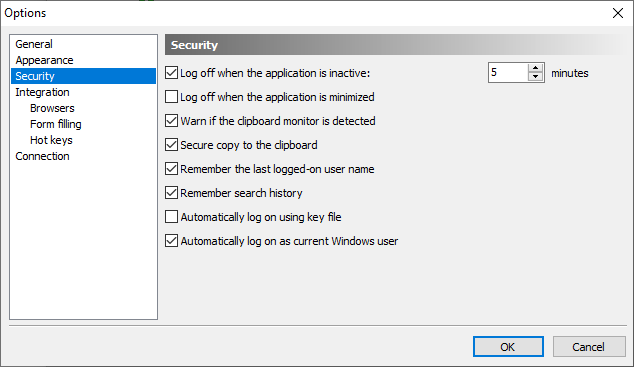
Log off when the application is inactive - this option forces automatic log off of the current user on expiry of the given time interval. When the program stays inactive for this period of time, an automatic log off will be performed.
NOTE: There is also the global inactivity timeout option, which is in effect for all clients. See the Disconnect a client when inactive option on the Security page in the Crypt-o system options.
•
Log off when the application is minimized - when this option is selected, the current user will be logged off when Crypt-o will be minimized.
•
Warn if clipboard monitor was detected - if some application is monitoring the clipboard contents, Crypt-o will warn you.
•
Secure copy to the clipboard - when this option is selected, a special secure clipboard operations are performed when you choose to copy a field to the clipboard. See Copying protected fields to the clipboard for more details. When this option is deselected, the regular copy to the clipboard will be used.
•
Remember the last logged-on user name- when this option is selected, the name of the last user logged on to Crypt-o will be selected by default next time the program is run.
•
Remember search history- when this option is selected, Crypt-o will save 20 recent search queries.
•
Automatically log on using key file- when this option is selected, Crypt-o will try to perform automatic log on using a user name and a key file, that were used for the last log on.
WARNING: Store key files on removable devices, such a USB flash drives, for security reasons. Unplug the device with your key file, when you have finished working with Crypt-o.
•
Automatically log as current Windows user- when this option is selected, Crypt-o will try to perform automatic log on of the current Windows user.
NOTE: This option is available only if automatic log on of the current Windows user is enabled for Crypt-o Clienton the Security page in the Crypt-o system options.


 Log off when the application is inactive - this option forces automatic log off of the current user on expiry of the given time interval. When the program stays inactive for this period of time, an automatic log off will be performed.
 NOTE: There is also the global inactivity timeout option, which is in effect for all clients. See the Disconnect a client when inactive option on the Security page in the Crypt-o system options.
 WARNING: Store key files on removable devices, such a USB flash drives, for security reasons. Unplug the device with your key file, when you have finished working with Crypt-o.