-
Home

-
Crypt-o
-
Documentation
- Exporting data
 |
Exporting data |


|
Crypt-o can export data to files of the following formats:
| • | XML file; |
| • | XML file in a ZIP archive; |
| • | Text file with delimiters; |
| • | .csv file (can be opened by Excel); |
| • | Rich text file (RTF); |
| • | Excel file (Excel2003 or later); |
| • | HTML file. |
 NOTE: The best way to export all data in a database is to use the XML file (ZIP archive) export file format. To perform the export, select a database, then select Database > Export all... in the menu and specify a file name of the output file.
All database data will be exported - records, folders, permissions, images, file attachments, form filling information.
NOTE: Only records with the Print and Export permission, granted for your user account, will be exported.
To export data to a file select Database > Export... in the menu. The export window will appear. Specify the target file and its type, export options and press OK to start the export.
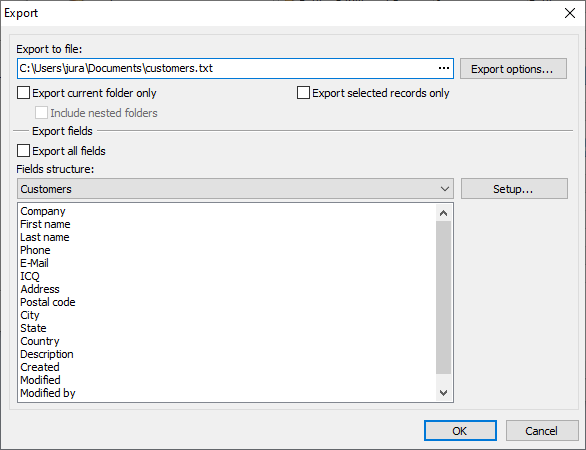
The Export window
The following export options are available:
Option |
Description |
Export current folder only |
If selected, only data from the currently selected folder will be exported. |
Include nested folders |
If selected, all nested folders of the currently selected folder will be also exported. |
Selected records only |
If selected, currently selected records will be exported only. |
Export all fields |
If selected, all data fields will be exported. |
Fields structure |
Displays which fields will be exported for every folder with different fields structure. To setup fields press the Setup... button. |
To specify advanced export options for a chosen file format press the Export options... button.
The following advanced export options are available for text and .csv file formats:
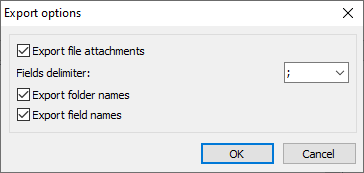
Export options for text and .csv files
Option |
Description |
Export file attachments |
If selected, file attachments will be exported and placed in the folder named <output_file_name>_files. |
Fields delimiter |
One or more character(s) are used to separate fields data. |
Export folder names |
If selected, the folder names will be exported. |
Export field names |
If selected, the field names will be exported. |
The following advanced export options are available for XML file format:
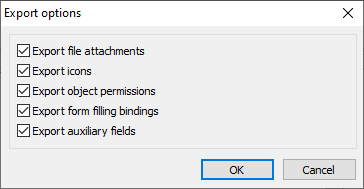
Export options for XML files
Option |
Description |
Export file attachments |
If selected, file attachments will be exported and placed in the folder named <output_file_name>_files. |
Export icons |
If selected, custom icons images will be exported and placed in the folder named <output_file_name>_files\icons. |
Export object permissions |
If selected, users and object permissions will be exported. |
Export form filling bindings |
If selected, information needed to perform form filling will be exported. |
Export auxiliary fields |
If selected, the following auxiliary fields will be exported: Created, Modified, Modified by. |