-
Home

-
Crypt-o
-
Documentation
- Backuping data
 |
Backuping data |


|
Crypt-o can create backups of all your data stored in all Crypt-o databases. Data backups can be made automatically or manually.
By default Crypt-o is configured to perform the following automatic backup tasks:
Task |
Description |
Daily backup |
Creates backup copies every day at 1:00AM and keeps the last 7 backup files.. |
Weekly backup |
Creates backup copies every week on Monday at 1:00AM and keeps the last 4 backup files. |
Monthly backup |
Creates backup copies every first day of month at 1:00AM and keeps the last 6 backup files. |
By default, backup files, created by automatic backup tasks, are stored in the backup folder inside the program's data folder on a computer where Crypt-o Server is running. By default it is the "C:\Program Files (x86)\Crypt-o\data\backup" folder.
Manual backups can be made only by users with the System administrator privilege. To create a backup choose Tools > Administrative tools from the menu. Then click on the Backup... link in the Administrative tools panel. The backup window will appear. Specify a backup file name on the Crypt-o Server computer and press OK to start the backup.
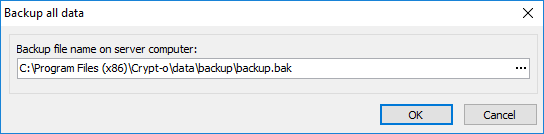
The Backup data window