-
Home

-
Crypt-o
-
Documentation
- Object permissions
 |
Object permissions |


|
Crypt-o allows you to set custom permissions for folders or even individual records.
 NOTE: Your user account must be an object owner to be able to edit the object's permissions.
To edit an object's permissions select the object and choose Edit > Permissions... from the menu.
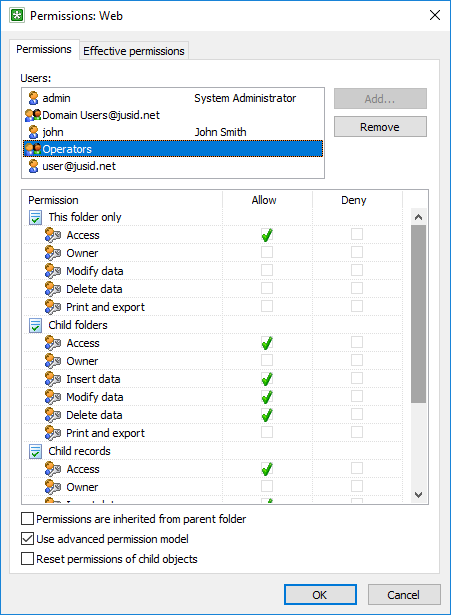
The object permissions window
The users list contains accounts for which permissions are configured for the object. Press the Add... button to add new users to the list and Remove to delete.
To allow or deny a permission for an account, choose the account in the list and then select the according checkbox (Allow or Deny) for the permission. The list of available permissions is documented in the User management topic
NOTE: Deny permission takes precedence over Allow permission when permissions of groups are applied. Use Deny only if it is absolutely necessary.
NOTE: If you delete an account from the list, the object will become completely unavailable to this account - the folders will be invisible and all of the records' data will be displayed as the asterisks ("*" symbols).
NOTE: It is needed to grant the database Access permission for a user account in order to be able to configure the account's permissions for child folders or records.
Inheritance of permissions
When you create a new folder or record, its permissions are fully inherited from a parent folder. To control inheritance use the  Permissions are inherited from parent folder checkbox.
When permissions are inherited:
| • | When permissions of the object's parents are changed, it affects permissions of the object. |
| • | An allow/deny state of inherited permissions is displayed as gray icons. |
| • | If Allow is inherited for a permission, you can change it to Deny. If Deny is inherited, it is not possible to change it. |
| • | You cannot delete inherited user accounts from the list. You can only change its permissions. |
When permissions are not inherited:
| • | When permissions of the object's parents are changed, it does not affect permissions of the object. |
| • | You have full control over who can access the object and which permission are set. |
For a folder set the Reset permissions of child objects checkbox to reset the permissions for all of the child objects and set full inheritance of permissions from this folder.
There are two permissions models available in Crypt-o for data objects - Basic and Advanced.
The model controls how the following permissions are applied: Access, Owner, Insert data, Modify data, Delete, Print and export.
Basic model (default):
| • | These permissions are always applied to the object and all child objects. |
Advanced model:
| • | These permissions can be separately applied to: This folder only, Child folders, Child records. |
To set the mode use the Use advanced permission model checkbox.
Effective permissions
To view effective permissions for a user account open the Effective permissions page.
By default, the effective permissions of the current user account is displayed. If you are the object's owner you can choose other user account by pressing the browse button.
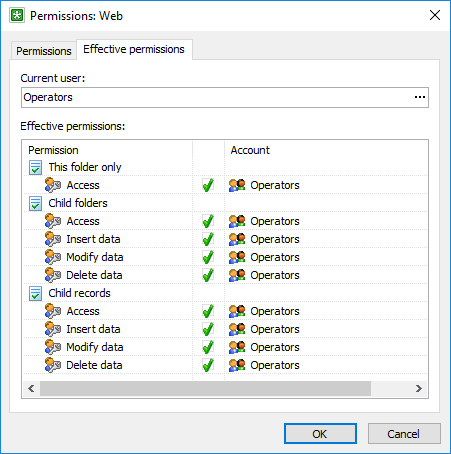
Effective permissions