-
Home

-
Crypt-o
-
Documentation
- Crypt-o system options - Web interface
 |
Crypt-o system options - Web interface |


|
This page is used to configure Crypt-o Web interface.
 NOTE: Crypt-o Web interface can be accessed via a secure HTTPS connection only. A TLS certificate is needed in order the Web interface to work.
It is recommended to obtain a TLS certificate from a trusted certificate provider. Then assign this certificate to Crypt-o Web interface. In such case, Web browsers will be able to verify the certificate and provide safe access to Crypt-o.
Also it is possible to create and use a untrusted self-signed certificate for Crypt-o Web interface. But it is not recommended, because Web browsers will not be able to verify such certificates.
NOTE: Users can be restricted from accessing certain databases via Web interface using the Web access permission.
 Enable Web interface - when this option is selected the Crypt-o Web interface will be available.
Web interface port - TCP port number for the Web interface.
NOTE: Enter the following URL in your browser to access Crypt-o: https://host.domain.com:24781
host.domain.com - is a full DNS name of a computer, where Crypt-o Server is running.
24781 - a Web interface port.
 IMPORTANT: Do not use an IP address or short host name in a URL to access Crypt-o Web interface. Always use a full DNS name of the host, where Crypt-o Server is running.
Browsers do not store session cookies when an IP address or short host name is used in a URL. In such case, Crypt-o Web interface will direct you to the logon page, when any link is clicked.
Allow legacy versions of TLS protocol - when this option is selected, Crypt-o Web interface can be accessed using legacy versions of the TLS protocol (TLS v1, v1.1).
WARNING: TLS v1 and v1.1 protocols are deprecated. Enable these protocols at your own risk only if you need to support access to Crypt-o Web interface using old web browsers.
Assign certificate... - use this button to assign an existing TLS certificate for Crypt-o Web interface. You can purchase an TLS certificate from many providers.
Create certificate... - use this button to create an untrusted self-signed certificate for Crypt-o Web interface.
The current state of Crypt-o Web interface is displayed in the Status box. You can start and stop Web interface using the corresponding buttons.
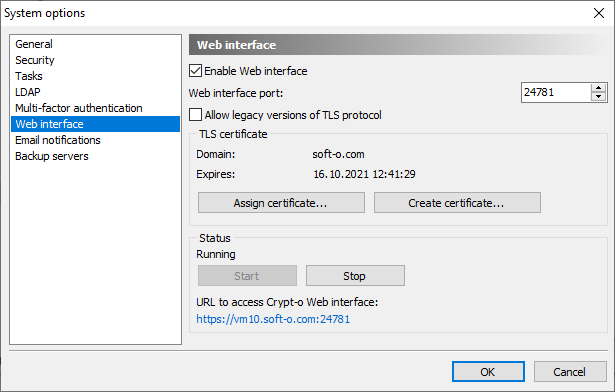
Web interface options