-
Home

-
Crypt-o
-
Documentation
- Managing client connections
 |
Managing client connections |


|
Users with the System administrator permission can view and manage active client connections to Crypt-o Server. To do that, choose Tools > Administrative tools from the menu. Then click on the Connections link in the Administrative tools panel.
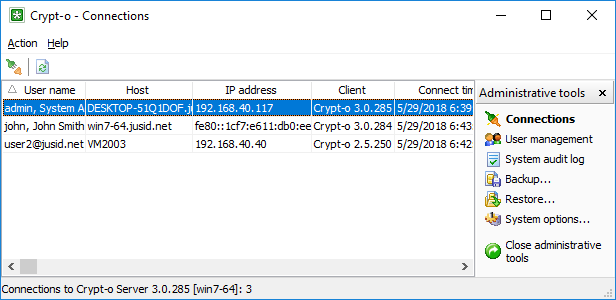
The Connections window
You will see all currently active client connections to Crypt-o Server.
To disconnect the selected client connection choose Action > Disconnect from the menu.
You can block all Crypt-o Client connections from an IP address for a certain period of time. To do that select a connection in the list and choose Action > Block IP address... in the menu. Then specify a time interval for the block and press OK.
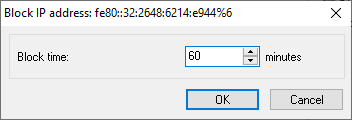
The Block IP address window
 NOTE: Crypt-o Server blocks an IP address automatically for 6 hours if there was 20 failed log on attempts from this IP address.
NOTE: All IP address blocks are removed when Crypt-o Server is restarted.
Unblocking IP addresses
To view the list of currently blocked IP addresses choose Action > View > Blocked IP addresses in the menu.
To unblock an IP address select its entry in the list and choose Action > Unblock IP address in the menu.